 Saleem
Organising daily medicine times for older adults, with reminders
How to add your medicines and their times in Saleem, mark each dose with one tap, get reminders on an Android phone, and see your adherence.
With several medicines, the daily question becomes: did I take the morning dose or not? Saleem never changes your medicines or suggests any; it is a notebook that reminds you of what your doctor prescribed and records what you took.
Add your medicines as written on the prescription
Open "Medicines" and add each one as written on the box or your doctor's prescription:
- Name, exactly as written.
- Dose, such as "one tablet".
- Instructions, such as "after food".
- Daily times, such as 8:00 and 20:00.
If your doctor changes the dose or the time, edit the medicine in Saleem after the visit. If they stop a medicine, choose to stop it rather than delete it, so its history is kept.
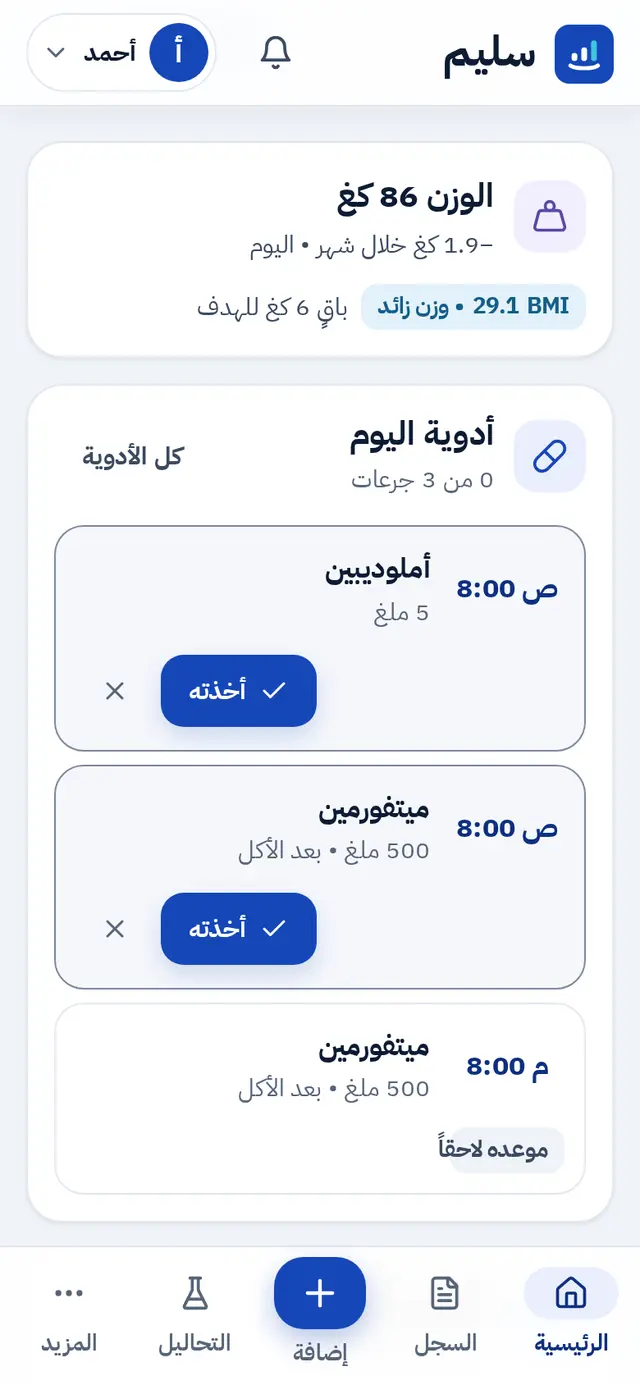
Today's doses on the home screen
Every day, today's doses appear on the home screen with two large buttons next to each: "Taken" and "Skip". A dose can be marked up to two hours before its time.
Reminders
- In the Android app: reminders are scheduled on the phone itself, so they arrive at dose time.
- In the browser: reminders show only while Saleem is open.
- Reading reminders: in Settings, up to four times a day to log sugar and blood pressure.
Adherence
Saleem works out the share of doses you took over the last 7 or 30 days, shown in "This week" and in the doctor report. It is a number that helps you and your doctor talk openly, not a pass or fail mark.
If one of your children helps you
If you give your son or daughter "view and add" access, they can mark a dose for you when they are with you. An AI assistant connected to Saleem, if you choose to connect one, can mark a dose when you ask it to. How family works in Saleem.
Rules that never change
- Never change a dose or stop a medicine because of a reading or a reminder; ask your doctor or pharmacist first.
- If you miss a dose, follow your doctor's or pharmacist's instructions, and never double the next dose on your own.
Create your account and add your medicines today.