 Saleem
How to read a lab report: test name, result, unit and reference range
A plain guide to the usual columns of a lab report, and how to copy them into Saleem exactly as printed to follow changes between visits. No medical interpretation.
A lab report is full of abbreviations and numbers, and every lab lays it out its own way. This article does not interpret your results; that is your doctor's job. Its aim is to show you where each piece of information sits on the sheet, so you can copy it accurately and ask the right questions.
The usual columns
Most lab reports have these columns, even if the names differ:
- Test name: usually in English, sometimes an abbreviation such as HbA1c or LDL.
- Result: the number or word the test produced.
- Unit: such as mg/dL, mmol/L or %. The unit is part of the result; the same number means something different in a different unit.
- Reference range: the range this lab uses for this test, such as 70 - 99.
- Flag: some labs print H for high or L for low next to the result.
Results that are not plain numbers
- Less than or greater than: "< 0.5" means the result is below the smallest amount the machine measures.
- Words: such as Negative, Positive or Trace, especially in urine tests.
- Ranges: such as "2 - 4" in some urine tests.
Why reference ranges differ between labs
Because machines, methods and units differ. So always read a result next to the range printed by the same lab. A result outside the range does not necessarily mean a problem, and one inside it does not necessarily mean all is well; your doctor reads it together with your whole situation.
Copy it into Saleem as printed
- Open "Lab tests" and choose to add a lab visit.
- Pick the tests from the list (more than a hundred are ready), or add any other test by name.
- Type the result exactly as printed, even "< 0.5" or Negative, and add the unit and reference range if the sheet shows them.
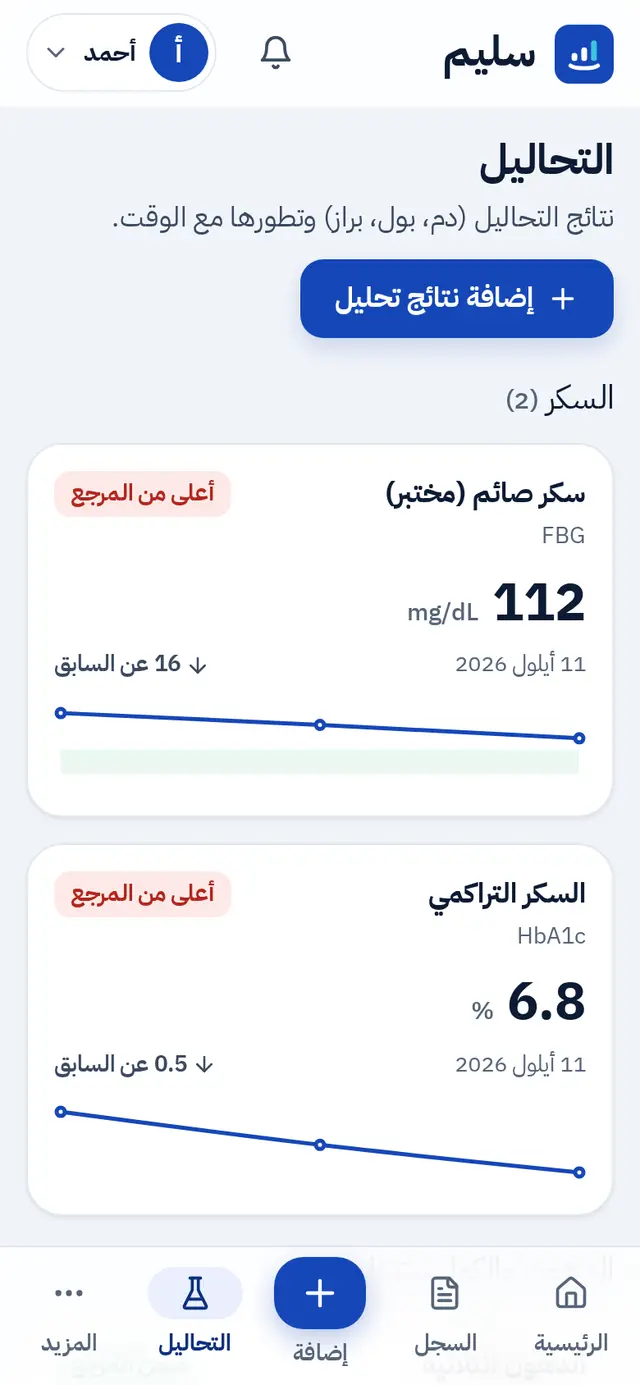
Saleem keeps the original text as you typed it, compares the result with the lab's own range when you enter it, otherwise with a general range, and shows the history of each test and the change since last time.
Useful questions for your doctor
- Has this result changed much since last time?
- Do I need to repeat this test, and when?
- Is there another test I should keep an eye on?
Read also what to bring to your doctor's appointment, or create your account and keep your lab results in one place.