 Saleem
What to bring to your doctor's appointment: your readings on one page
A short checklist for a doctor's visit, what the Saleem report includes, and how to print it or send it as a link that expires by itself.
Doctor's appointments are short and there is a lot to ask. Part of the visit can disappear while searching for a number or date: when was the last reading, and what was the previous lab result? The Saleem report brings the information you logged onto one page so the conversation can start more clearly.
A few days before
- Log regularly: sugar and blood pressure, as your doctor asked.
- Run a blood-pressure week if the visit is about blood pressure. How to measure blood pressure at home.
- Enter your latest lab results in "Lab tests" exactly as printed.
- Check your medicine list in "Medicines": name, dose and times.
- Write down your questions on paper or in a note on your phone.
What the report includes
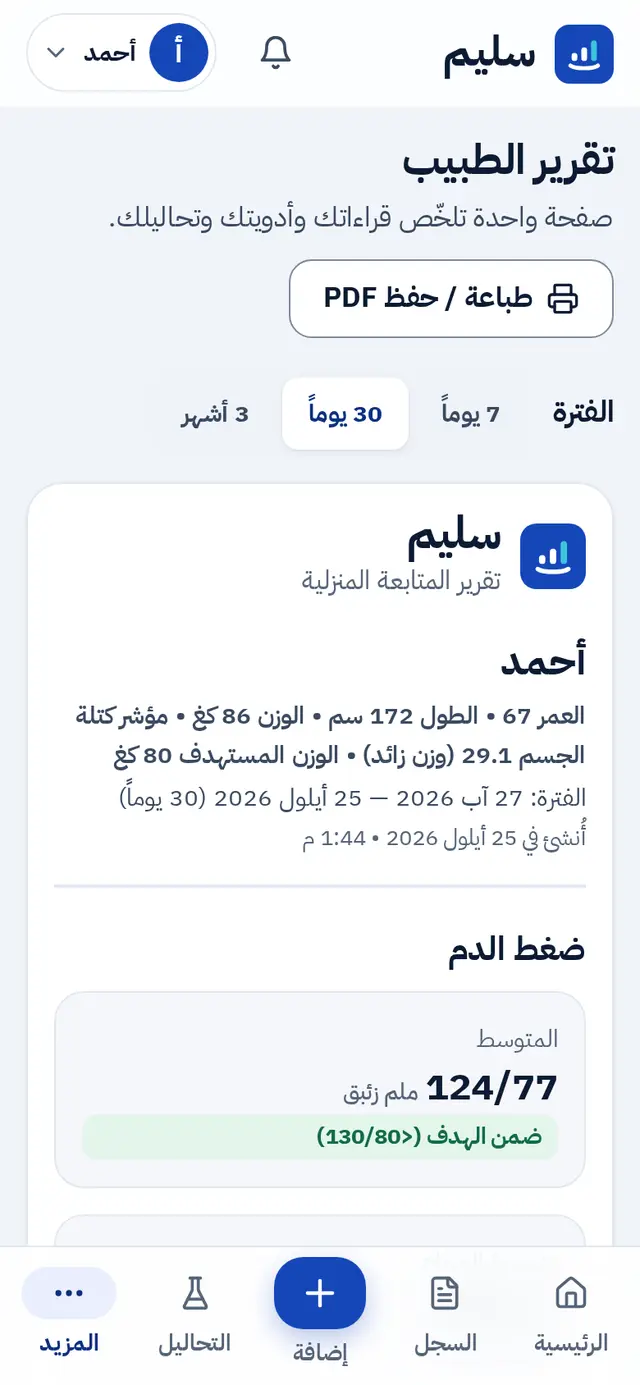
You pick the period, the last 7, 30 or 90 days, and the report includes:
- Name, age, height, weight and BMI.
- Blood pressure: number of readings, average, morning and evening averages, share on target, highest reading, and the blood-pressure week status.
- Sugar: fasting and after-meal averages, lowest and highest readings, and how many were low or high.
- Weight, and mood and energy.
- Medicines with their times, instructions and adherence.
- Lab tests: the latest result of each test with its reference range and the previous result.
Three ways to get it there
- Print it from your phone or computer.
- Save it as a PDF to send or keep.
- Send a private link that expires after a day, a week or a month. It comes with a QR code the doctor can scan in the clinic and a WhatsApp button, and Saleem shows you how many times it was opened.
About the link
Anyone who has the link can open the report, without an account, until it expires. So send it to your doctor only and choose the shortest period that works. You can revoke it at any moment from the report page.
At the clinic
- Start with your most important question.
- If your doctor changes a medicine or a dose, update "Medicines" in Saleem after the visit so the list stays correct.
- The report is numbers that help your doctor; the decisions are theirs.
Read also how to read your lab report, or create your account and prepare your first report.